Designing for Humans and Machines: The 2026 UX Multi-Tool
Power Digital Media LLC
Agency
TL;DR — Direct Answer Block
The 2026 UX Multi-Tool is a dual-layered design philosophy that resolves the conflict between aesthetic minimalism and machine readability.
The Shift: Semantic clarity for AI vs. accessibility for humans is no longer a trade-off. What aids a screen reader now perfectly aids an autonomous AI shopping or booking agent.
The Solution: By meticulously applying ARIA guidelines, structural HTML5 tags, and hidden context elements, interfaces serve both the visual human and the navigating algorithm. This eliminates ambiguity in retrieval execution, securing authority without compromising the visual experience.
The Problem with Visual Inference
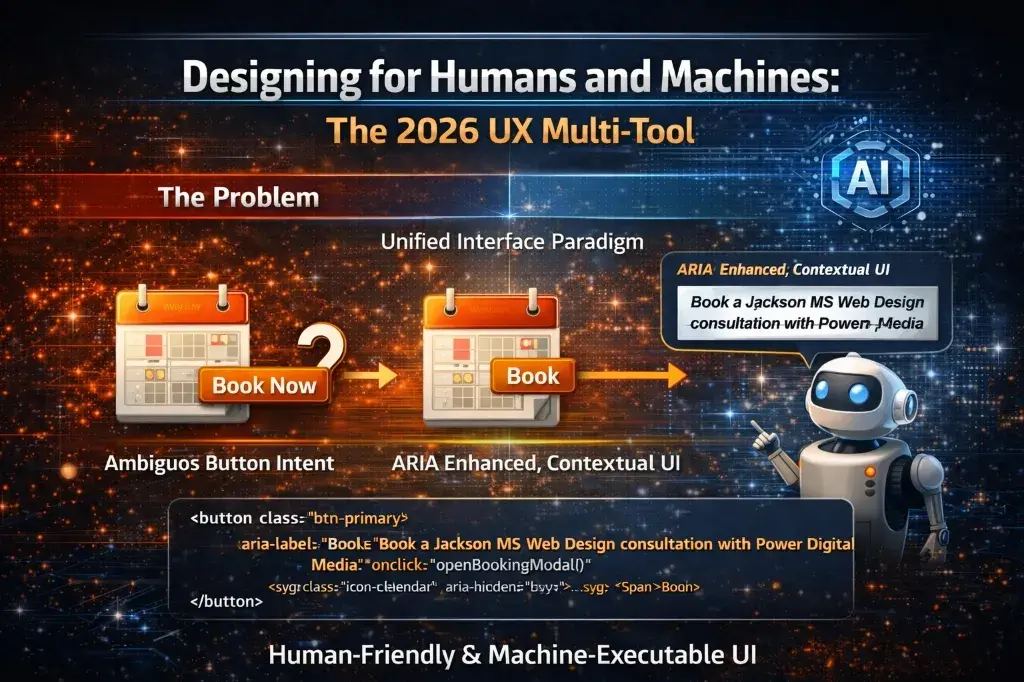
For humans, a picture of a calendar next to a "Book Now" button makes absolute sense. For an AI extraction agent, relying on visual inference introduces friction. If the button simply reads "Book Now," the machine may struggle to guarantee what is being booked, especially on a complex service page.
This is where accessibility standards overlap brilliantly with AI operational SEO. Referring closely to the W3C ARIA Standards, developers can utilize Accessible Rich Internet Applications (ARIA) tags. These tags were built for humans with disabilities, providing screen readers exact descriptions. In 2026, those same exact descriptions represent the semantic clarity AI agents crave.
The Unified Interface Paradigm
When building the architecture of AI-Executable Websites, UI design requires this multi-tool approach. A robust 2026 Marketing Intelligence Hub strategy isn't just about outputting data; it's about making that data interactable.
Layering this logic on top of High-Performance CSS ensures the UI does not shift while the machine reads the code, and injecting Geographic Trust Anchors in the metadata ensures local trust context. Everything works as a single unit.
Tactical: How to Implement ARIA for Machine Context
You can immediately optimize buttons for both Accessibility and AI clarity using standard HTML ARIA tags.
1. Copy-Paste HTML Snippet
<!-- Visual UI: Calendar Icon + "Book" -->
<!-- Machine UI: Detailed operational context -->

<button
  class="btn-primary"
  aria-label="Book a Jackson MS Web Design consultation with Power Digital Media"
  onclick="openBookingModal()"
>
  <svg class="icon-calendar" aria-hidden="true">...</svg>
  <span>Book</span>
</button>
2. Implementation Walkthrough
- Identify Key Execution Actions: Locate your main conversion interfaces (e.g., booking form, contact button).
- Inject ARIA Label: Add the
aria-labelattribute containing expanded, context-rich text. Do not just say "Book." Say "Book a consultation for [Service]." - Hide Decorative Elements: Use
aria-hidden="true"on icons that provide zero semantic value to the machine, reducing processing noise.
Executing for Core Services
Our specialized architecture services ensure your site meets these dual-intent standards. At Power Digital Media in Jackson, Mississippi, every Web Design or Production portal we deploy leverages these structural UX signals. When an algorithmic assistant traverses our ecosystem, it knows precisely what every button triggers, drastically improving the chances of an automated referral.
FAQ Section
What is the UX Multi-Tool? It is a dual design paradigm that simultaneously satisfies semantic clarity requirements for AI agents and accessibility needs for human users.
Does ARIA markup help AI SEO? Yes. ARIA attributes historically built for screen readers provide perfect, context-rich semantic signals for AI navigational agents, eliminating interaction ambiguity.
Is this only necessary for eCommerce? No. Service businesses need agent-navigable interfaces as much as retailers so that AI assistants can confidently parse scheduling and contact architectures.
Begin Your Digital Legacy.
Our team is ready to help you implement these strategies and build a brand that lasts.
Schedule A Free Consultation